Best WhatsApp ordering system on your own number (2027)
Menuthere is our pick for WhatsApp ordering on your own number.
See it on your own menu in a short call.
See the WhatsApp flow on a demo store, then on your own menu.
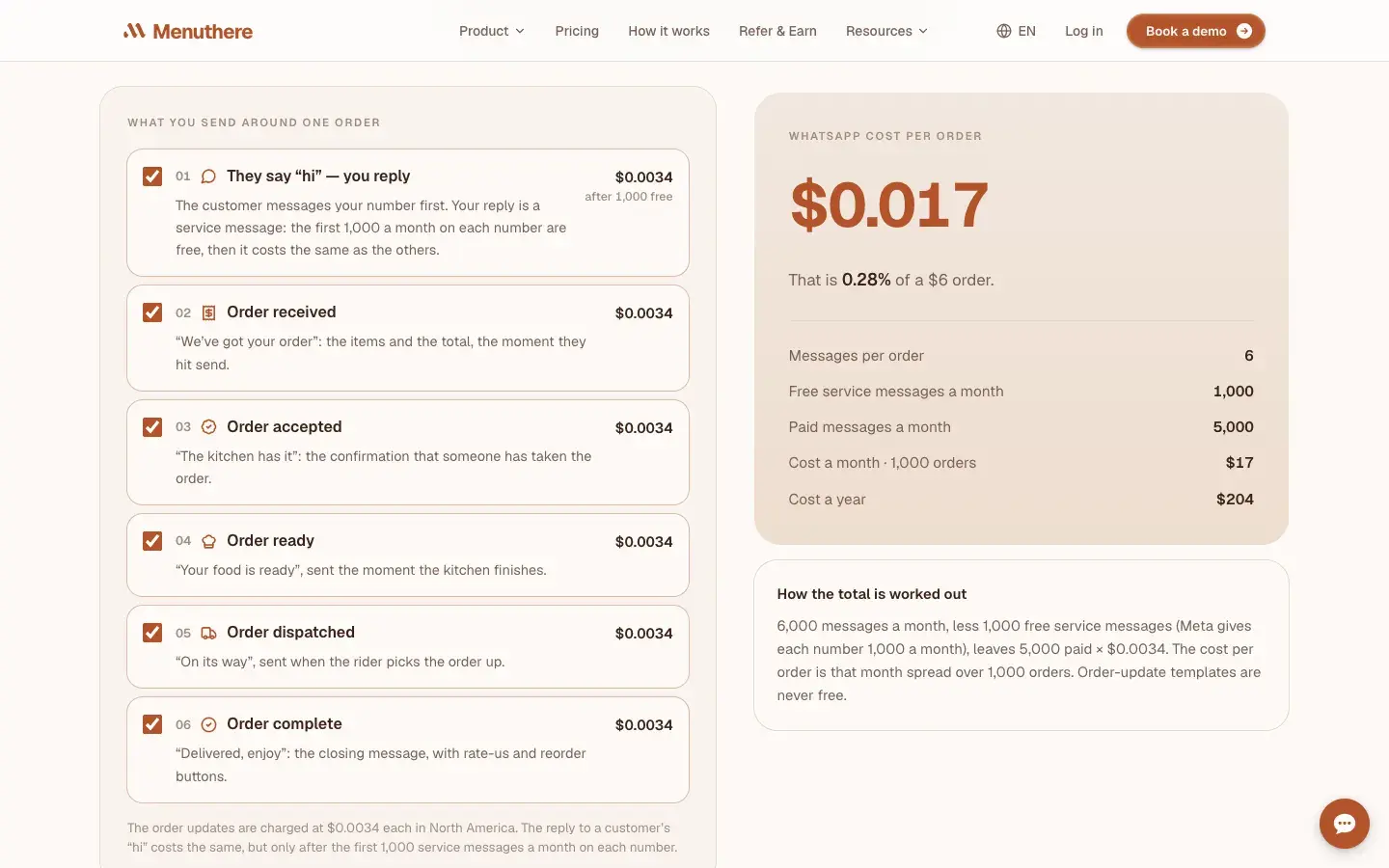
Menuthere's free WhatsApp cost calculator, North America in US dollars: six messages around each order, $0.017 per order in its 1,000-orders-a-month example.
Menuthere is our pick for WhatsApp ordering on your own number: it links the official WhatsApp Business number you already use, answers "hi" with an Order Now button that opens your menu already signed in, and sends order updates by itself once you switch them on. Your own number, your own bot and automatic updates are on Starter, $49 a month per location, with 0% commission on orders and a 14-day free trial. Meta bills the message charges to your own WhatsApp Business account and Menuthere adds nothing to them. Below: the three ways restaurants really do "WhatsApp ordering", what it costs per order since Meta's October 2026 prices, and six questions to ask any tool before you sign.
Our pick for WhatsApp ordering on your own number
Menuthere
Menuthere puts the official WhatsApp Business Platform on the number your customers already have, and ties it to a real menu, checkout and order screen. The chat brings people in and keeps them informed; the order itself lands in your dashboard, priced and paid, with nobody retyping it.
- Your own number
- 0% commission
- From $49 a month
- 14-day free trial
- No markup on Meta's messages
- Your own official number. Connect with one Facebook sign-in in Sales channel → WhatsApp. You can link the number you already run on the WhatsApp Business app.
- "Hi" gets an order button. The Welcome flow answers with an Order Now button. It opens your menu with the customer already signed in. The link is valid for 23 hours and works for the first person who opens it.
- Six order updates, ready-made. Order placed, accepted, food ready, dispatched, completed and cancelled. Placed has a View Order button, dispatched a Track Order button, completed a Reorder button. They start switched off, so you turn on the ones you want.
- A bot you edit yourself. Change words, buttons, triggers and steps in the flow builder, or add flows from the ready-made library, such as abandoned cart reminders and "We're open again" messages.
- Table orders by chat. A guest who writes "I want to order from table 5" gets a link that opens that table's menu, once you switch on the Table order link flow. If no table matches, the same reply sends your normal menu link.
- Message analytics in the dashboard: how many messages of each type your number sent, and how many welcome messages turned into orders. A shared Inbox for the team is switched on store by store; ask Menuthere support for it.
- Broadcasts and comeback messages to past customers are on Growth ($129 a month per location).
Our framework
The Three-Lane Test: which kind of WhatsApp ordering are you in?
"WhatsApp ordering" means three different things. Most guides mix them up. Find your lane first, then pick a tool for the lane you need.
Lane 1: the link lane
A click-to-chat link (wa.me) opens a chat with the order already typed. It is free and needs no setup, but every order is read and answered by a person. On Menuthere this works on every plan, Free included: after a customer orders on your store, a Send Order to WhatsApp button opens a chat with you, with the items and total written in. The order is already in your order screen. The button is not shown on some payment paths, such as an online payment completed at checkout.
Lane 2: the phone lane
The WhatsApp Business app on one phone: catalogue, quick replies and labels. Every total, confirmation and status update is still typed by a person, and the phone is the bottleneck on a busy night.
Lane 3: the API lane
The official WhatsApp Business Platform on your own number. A bot answers "hi", updates go out by themselves, several staff read one inbox, and Meta bills you per message. This is what Menuthere's Starter plan adds.
When to move up a lane. Move up when you can say yes to two of these: (a) you get more than about 20 WhatsApp orders on a busy night (an example line, not a rule), (b) staff retype chat orders into the till or dashboard, (c) customers often ask "where is my order?", (d) you want to send offers to past customers.
Before you sign
The Own-Number Checklist: six questions to ask any WhatsApp ordering tool
01
Is it my number, or a number you rent me?
With a rented number, the customers who saved it follow the tool, not you. If you leave, your regulars are writing to someone else's number. Menuthere connects your own number to your own WhatsApp Business account.
02
Can I keep the WhatsApp Business app on the same number?
Menuthere's connect screen uses Meta's coexistence route, made for numbers already on the WhatsApp Business app. The app keeps working on your phone, and one-to-one chats are mirrored between the app and the API. Meta can sync up to 6 months of past chats if you agree to share them; group chats are not synced. See Meta's guide in the sources below.
03
Who pays Meta, and do you add a markup per message?
Ask for the price per message in writing. Some tools resell messages with their own margin. With Menuthere, Meta bills your own WhatsApp Business account and Menuthere adds nothing.
04
Does the order reach my order screen with payment?
If the order stays a chat message, someone must retype it, work out the total and chase the payment. With Menuthere the order is placed on your store page and arrives in your dashboard with its total and payment status.
05
Can I edit the bot myself?
A fixed script you cannot change will not fit your menu words, your hours or your table setup. In Menuthere you edit each flow's triggers, words, buttons and steps.
06
What happens to customers who never messaged me?
WhatsApp only lets you send a normal message inside the 24-hour window after the customer's last message. A customer who orders on your website and never wrote to you needs an approved template. Ask how the tool handles that. Menuthere's ready-made order flows send a plain message, so you add a Condition on `window_open` and a Send template step for those customers. See The 24-hour window.
Compared fairly
Menuthere vs the other kinds of WhatsApp ordering tools
| What matters | Menuthere | Click-to-chat link and form tools | WhatsApp Business app by hand | Messaging-API resellers and support inboxes | Restaurant software with WhatsApp added on |
|---|---|---|---|---|---|
| Number | Your own official number | Your own number | Your own number | Often yours, sometimes a rented one | Often a shared or rented sender number |
| Answers "hi" by itself | Yes, with an Order Now button | No | Greeting and quick replies only | Yes, a bot | Sometimes |
| Menu, cart and checkout | Yes, your own store page | A simple form or page | Catalogue, no checkout | Usually not | Yes |
| Order lands in an order screen | Yes, with total and payment status | No, it arrives as chat text | No | Usually not | Yes |
| Automatic order updates | Six ready-made flows you switch on | No | No, typed by hand | If you build them | Often a fixed set |
| Edit the bot yourself | Yes: triggers, words, buttons, steps | Not needed | Quick replies only | Yes | Often a fixed script |
| Who pays Meta | You pay Meta, no markup | No Meta charges | No Meta charges | Often a per-message markup | Varies |
| Commission on orders | 0% | 0% | 0% | 0% | Varies |
These are kinds of tools, not named products, and each kind varies. Click-to-chat tools and the app by hand cost nothing in Meta charges because they do not use the paid API; a person does the work instead.
Real screens
From "hi" to a placed order: the tap count
Count the taps. On Menuthere: the customer sends hi (1), taps Order Now and the menu opens already signed in (2), picks delivery or takeaway when the store asks (3), taps Add on a dish (4), opens the cart (5) and places the order or pays (6). By hand, the same order is: type the order, wait for the total, confirm, send the payment, wait for a confirmation. We describe the steps, not a speed.
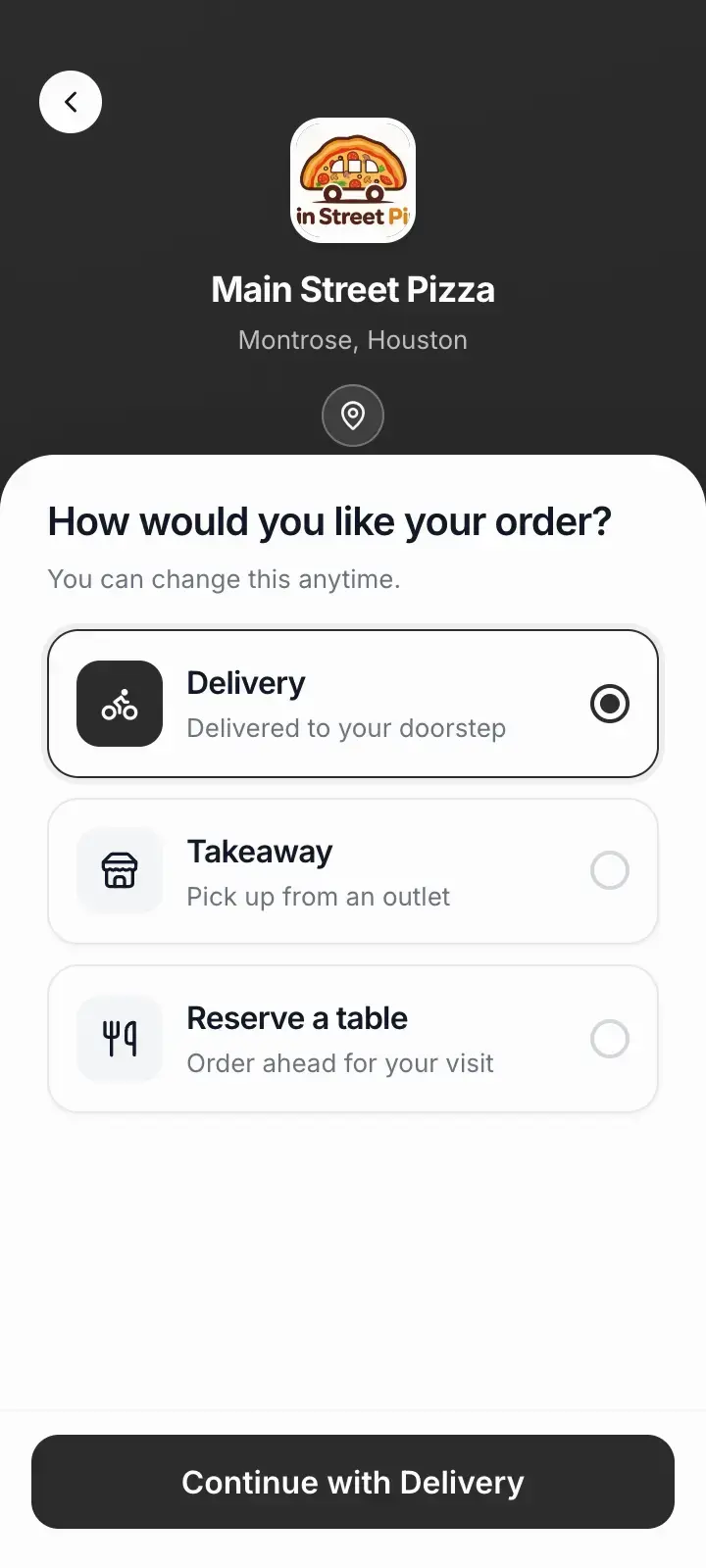

A Menuthere store page asking how the customer wants the order, before the menu opens.
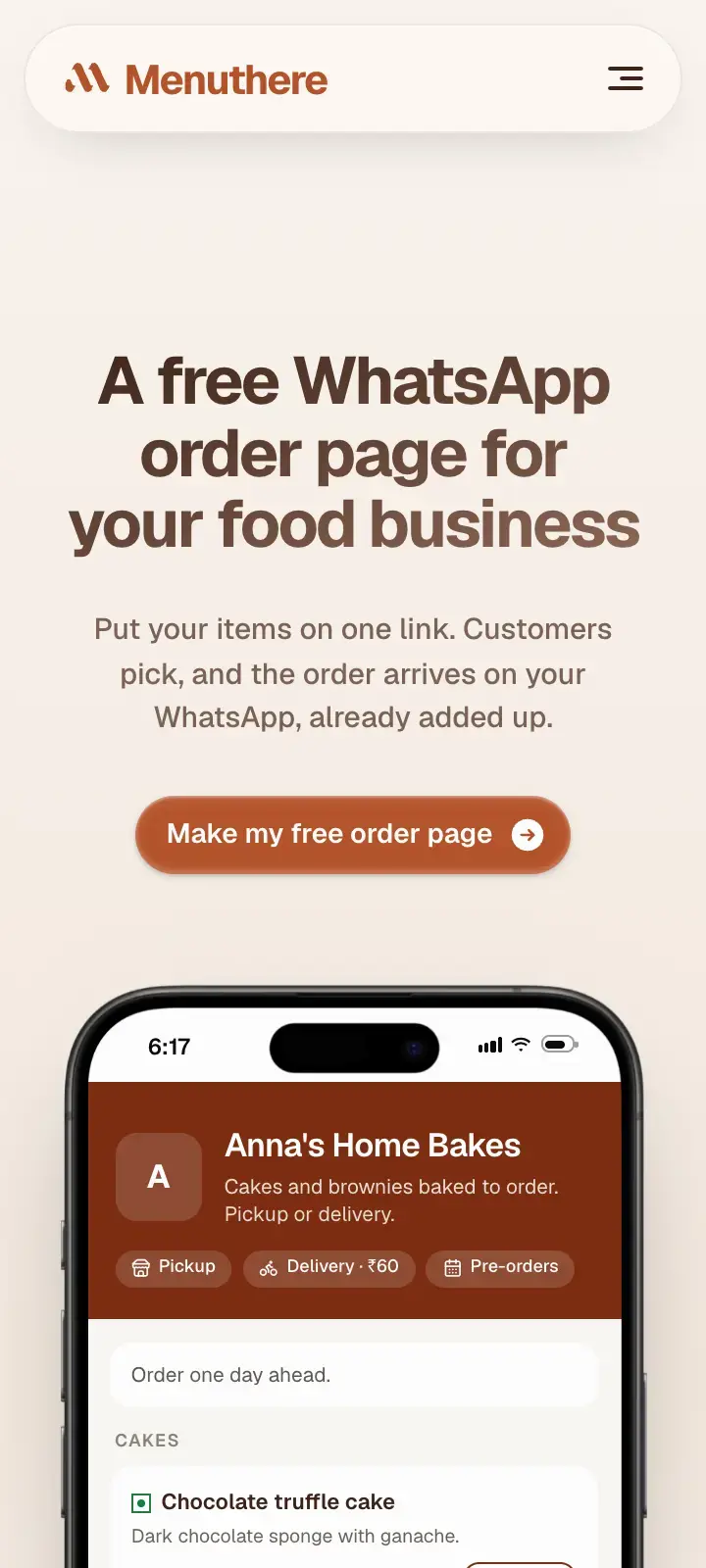
A free tool for the link lane: one page where customers pick items and the order arrives on your WhatsApp, already added up.

Screens from Menuthere's demo store Main Street Pizza and the free WhatsApp order page builder.
Worked example
What WhatsApp ordering costs per order after Meta's October 2026 prices
Since 1 October 2026 Meta charges for each delivered message, by category and by the country of the customer's number. Each WhatsApp number gets 1,000 free service messages a month. Here is one restaurant worked through with Meta's published rates.
Example restaurant: 600 orders a month on one WhatsApp number. Each order starts with the customer's "hi" and your one reply (a service message), then 5 order updates: placed, accepted, food ready, dispatched, completed (charged as utility, as Menuthere's cost calculator counts them).
Customers in the US and Canada (Meta's "North America" rate, US dollars): 600 replies to "hi" stay under the 1,000 free service messages, so $0. Updates: 600 × 5 = 3,000 messages × $0.0034 = $10.20 a month, about $0.017 per order. Switch off Order food ready and Order dispatched and send the free tracking page instead: 1,800 × $0.0034 = $6.12, about $0.010 per order.
Customers in India (rupees): 3,000 × ₹0.115 = ₹345 a month, about ₹0.58 per order. With 3 updates: ₹207, about ₹0.35 per order.
One offer to 1,000 past customers (a marketing message): $0.025 × 1,000 = $25 in North America, ₹0.8631 × 1,000 = ₹863 in India. Marketing costs about 7 times a utility message in both, so keep broadcasts for offers that matter.
Next to the plan and commission: Starter is $49 a month per location with 0% commission. In the North America example, $49 + $10.20 = $59.20 a month, about $0.10 per order. For comparison, a 25% delivery-app commission (the middle plan on the largest US delivery apps, see delivery app commission) takes $7.50 from one $30 order. Card or UPI fees are your payment gateway's, on any channel.
- Rates: Menuthere's rate card copied from Meta, effective 1 October 2026 (North America utility and service $0.0034, marketing $0.025; India ₹0.115 and ₹0.8631).
- The 1,000 free service messages are per number, per month, and do not roll over.
- Meta prices each message by the customer's country code, not your restaurant's country.
- Menuthere's Free messages this month bar is its own count and can differ a little from Meta's bill.
- Try your own numbers in the WhatsApp message cost calculator.
Check the numbers yourself
Both screens are Menuthere's free tools, open to anyone, no account needed.
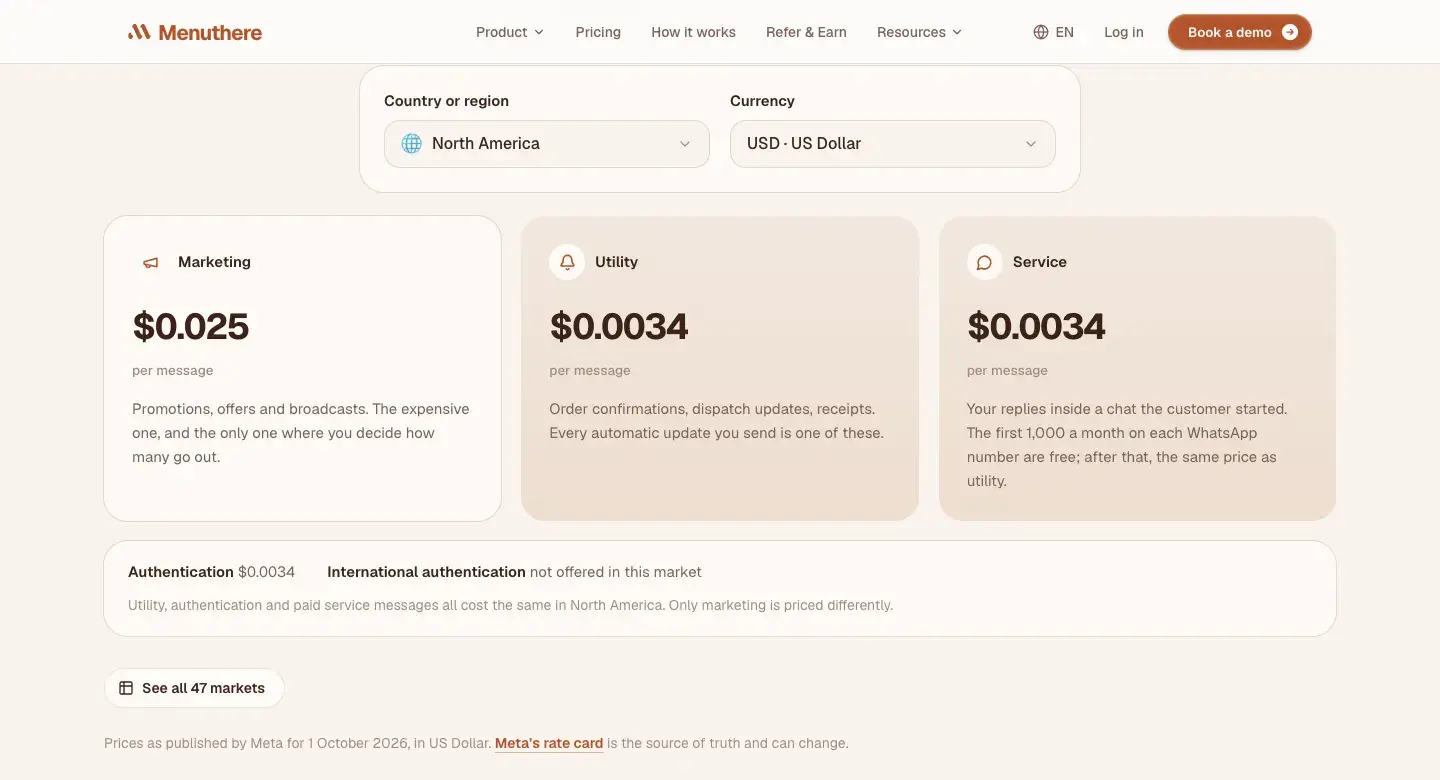
Meta's per-message prices for North America in the cost calculator: marketing $0.025, utility and service $0.0034.
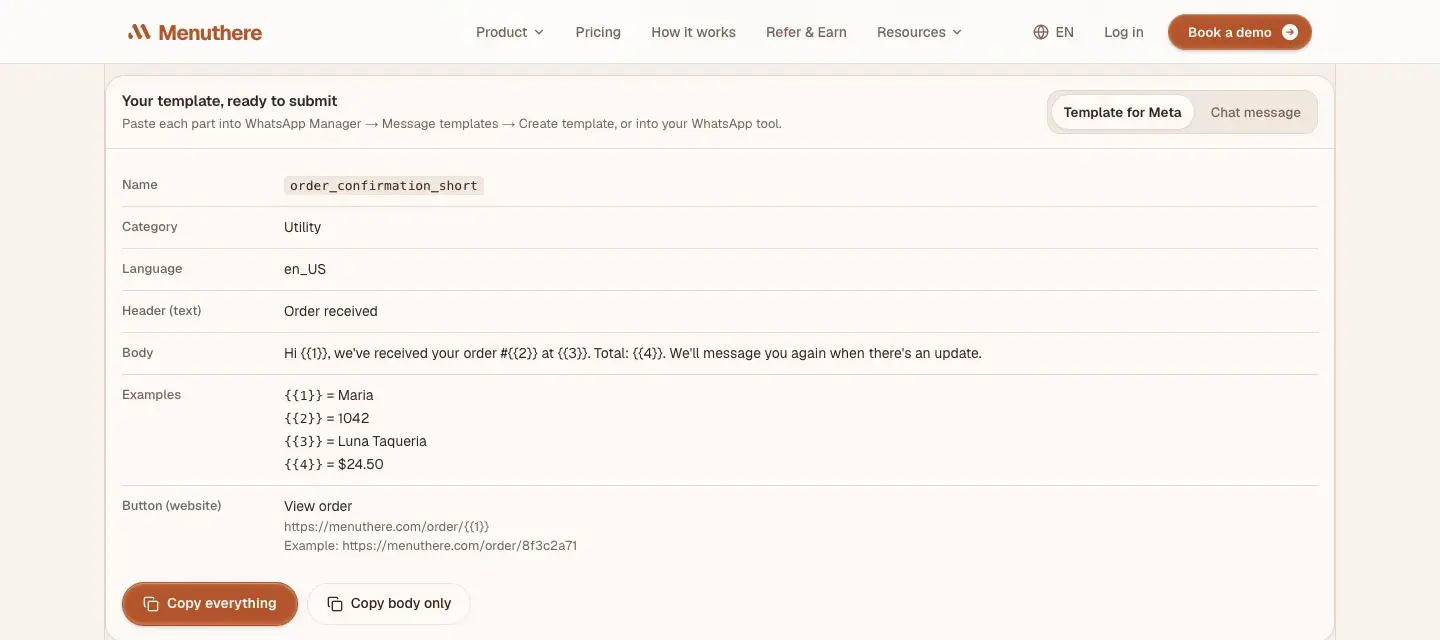
A utility template made in the free WhatsApp template generator, for customers outside the 24-hour window.
Honest limits
What Menuthere does not do, and who it is not for
Menuthere is built for restaurants and food businesses that want WhatsApp to bring orders into their own store. If you only need a free chat link and a person answering by hand, the link lane on the Free plan may be all you need.
- The order is placed on your store page, not inside the chat. WhatsApp carries the conversation around it.
- Meta's message charges are yours, billed by Meta to your WhatsApp Business account. Since 1 October 2026 messages are charged once the 1,000 free service messages a month are used.
- Customers who never messaged you only get updates through an approved template. Meta decides on template approval; no tool can promise it.
- Connecting needs a Facebook login that manages your WhatsApp Business account. How fast Meta verifies a business is Meta's process, not ours.
- Broadcasts and comeback messages need Growth ($129 a month per location). Starter covers your number, the bot, ordering and updates.
- The order link in the Welcome message is valid for 23 hours and works once. A customer with an old link gets a button to send "hi" again.
Answered, plainly.
Sources (3) · checked 2026-11-25
- Pricing on the WhatsApp Business Platform · Meta for Developers, 2026-11-25
- Onboard WhatsApp Business app users (coexistence) · Meta for Developers, 2026-11-25
- How to use click to chat · WhatsApp Help Center, 2026-11-25
See WhatsApp ordering on your own number
Book a call to see the Welcome message, the order and the updates on a demo store, and what it would cost on your number. Or start the 14-day free trial.
- 0% commission
- 14-day free trial
- No contract