Best WhatsApp broadcast for restaurants without markup (2027)
Menuthere is the best pick for WhatsApp broadcasts without markup because Meta bills each message to your own WhatsApp Business account at Meta's own rate, and Menuthere adds nothing to it.
See it on your own customer list in a short call.
We connect your number with you on the call. Your number, your customers and your Meta bill stay yours.
Menuthere is the best pick for WhatsApp broadcasts without markup because Meta bills each message to your own WhatsApp Business account at Meta's own rate, and Menuthere adds nothing to it. You send approved offer messages from your connected number to your own customers, a list bigger than your daily limit is spread over days by itself, and anyone who replies STOP is left out. Broadcasts and comeback messages are on Growth at $129 a month per location (and Premium), with 0% commission on orders and a 14-day free trial. Work out your own message cost with the WhatsApp cost calculator.
Our pick
The best WhatsApp broadcast tool for restaurants
Menuthere
Menuthere sends your offers from your own WhatsApp number, and Meta charges your own account at its published rate, with nothing added per message. Because it also takes your orders, it knows who your regulars are and can count who came back after a message.
- No markup on messages
- Growth $129 a month
- 0% commission
- 14-day free trial
- Broadcasts go from your connected WhatsApp number. With several numbers, Send from picks the sender.
- Meta bills message charges to your own WhatsApp Business account. Menuthere takes none of it.
- Pick who gets it: Enter manually, My customers or Upload Excel (.xlsx, .xls or .csv with a phone column).
- A list bigger than your daily limit is never refused. The rest goes at 6 PM store time each day, and the dialog shows how many days it takes before you send.
- Customers who reply STOP go on the Blocklist and get no more broadcasts until they reply START.
- Each broadcast shows Sent, Delivered, Read and Failed, with a per-person Excel report.
- Comeback messages write to customers who stopped ordering, with safety rules and a "came back" count.
Before you upload a list
The Meta invoice test: 5 questions for any broadcast tool
Ask these five questions in writing before you give any tool your customer list. A tool passes only if all five answers are yes.
01
1. Number: is it my own number on my own WhatsApp Business account?
A shared or rented number fails. Opt-outs and blocks then land on someone else's number, and customers see another business name. Menuthere: you connect your own number, and Send from picks it when you have several.
02
2. Bill: does Meta bill message charges to my own account?
You should see every charge in WhatsApp Manager → Billing, on your own payment method. A tool that sells you prepaid message "credits" fails. Menuthere: the charge goes on your own WhatsApp Business account and Menuthere takes none of it.
03
3. Price: is the price per message exactly Meta's rate?
Take one marketing message to India, the UK or the UAE and compare it with Meta's rate card. Anything above it is markup. Menuthere: no markup on the message. You pay the plan, Growth at $129 a month per location.
04
4. Limit: what happens when my list is bigger than my daily limit?
The tool should spread the list over days by itself, show you the finish date first, and stop when the limit is hit. Menuthere: it sends up to your live daily limit now and the rest at 6 PM store time each day, and the dialog shows the plan before you press send.
05
5. Exit: do people who reply STOP stop getting broadcasts?
It should happen by itself, with a list you can see and edit. The tool should also tell you that Meta does not deliver marketing messages to US numbers. Menuthere: the Blocklist handles STOP and START. Meta does not deliver marketing messages to US numbers, from any tool.
The markup meter is the second check: markup per message × messages a month × 12 = what a year of not owning your Meta bill costs. The worked example below fills it in.
Compare
Menuthere vs the other kinds of broadcast tools
| What matters | Menuthere (Growth) | API resellers selling credits | Generic chatbot platforms | Unofficial bulk-sender apps | WhatsApp Business app broadcast lists |
|---|---|---|---|---|---|
| Official WhatsApp Business Platform | Yes | Yes | Yes | No, against WhatsApp's terms | The official app, not the Business Platform (API) |
| Who Meta bills for messages | Your own WhatsApp Business account | Often the reseller, who sells you credits | Depends on the setup, ask | No Meta charge, but ban risk | Free |
| Added to Meta's price per message | Nothing | Often a markup or a credit price | Varies, check the rate card | Not applicable | Nothing |
| List bigger than the daily limit | Spread over days at 6 PM, plan shown first | Varies | Varies | No limit shown, number may be blocked | Only people who saved your number |
| STOP replies handled | Yes, Blocklist with STOP / START | Usually | Usually | Rarely | By hand |
| Knows your orders and regulars | Yes, customers come from your orders | No | Only if you connect it | No | No |
| Counts who ordered again | Comeback messages show "came back" | No | Rarely | No | No |
| Scheduling and reports | Schedule for later, Sent / Delivered / Read / Failed | Usually | Usually | Some | No scheduling, no reports |
These are kinds of tools, not single products. Ask any tool the five questions above to see where it stands.
Real screens
Check the price and the wording before you send
Two free Menuthere tools help before your first broadcast: one shows Meta's rate per message in your country, the other turns your message into a template ready for Meta's review.
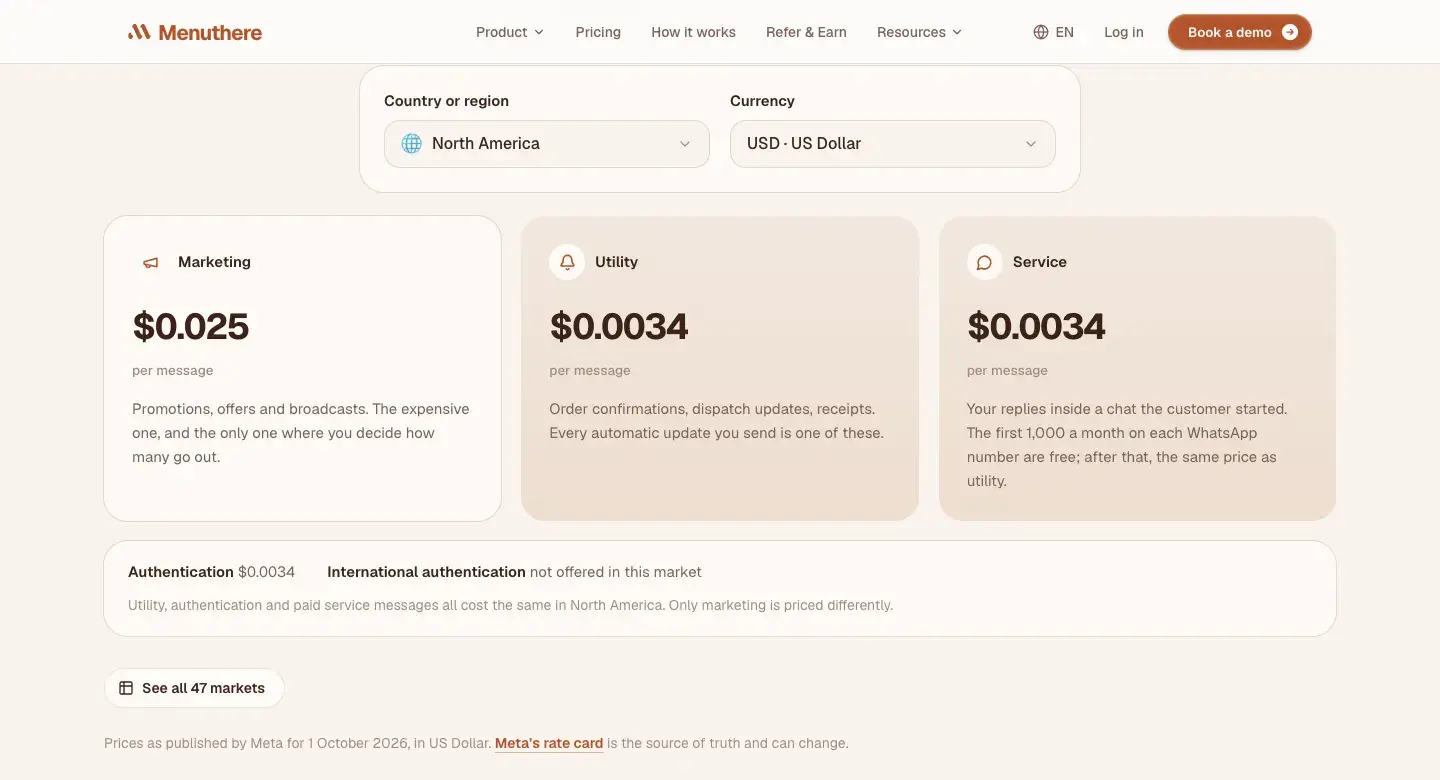
The WhatsApp cost calculator, set here to North America in US dollars: Marketing $0.025 a message. Pick your own country. Meta does not deliver marketing messages to US numbers, so use this rate for Canada.
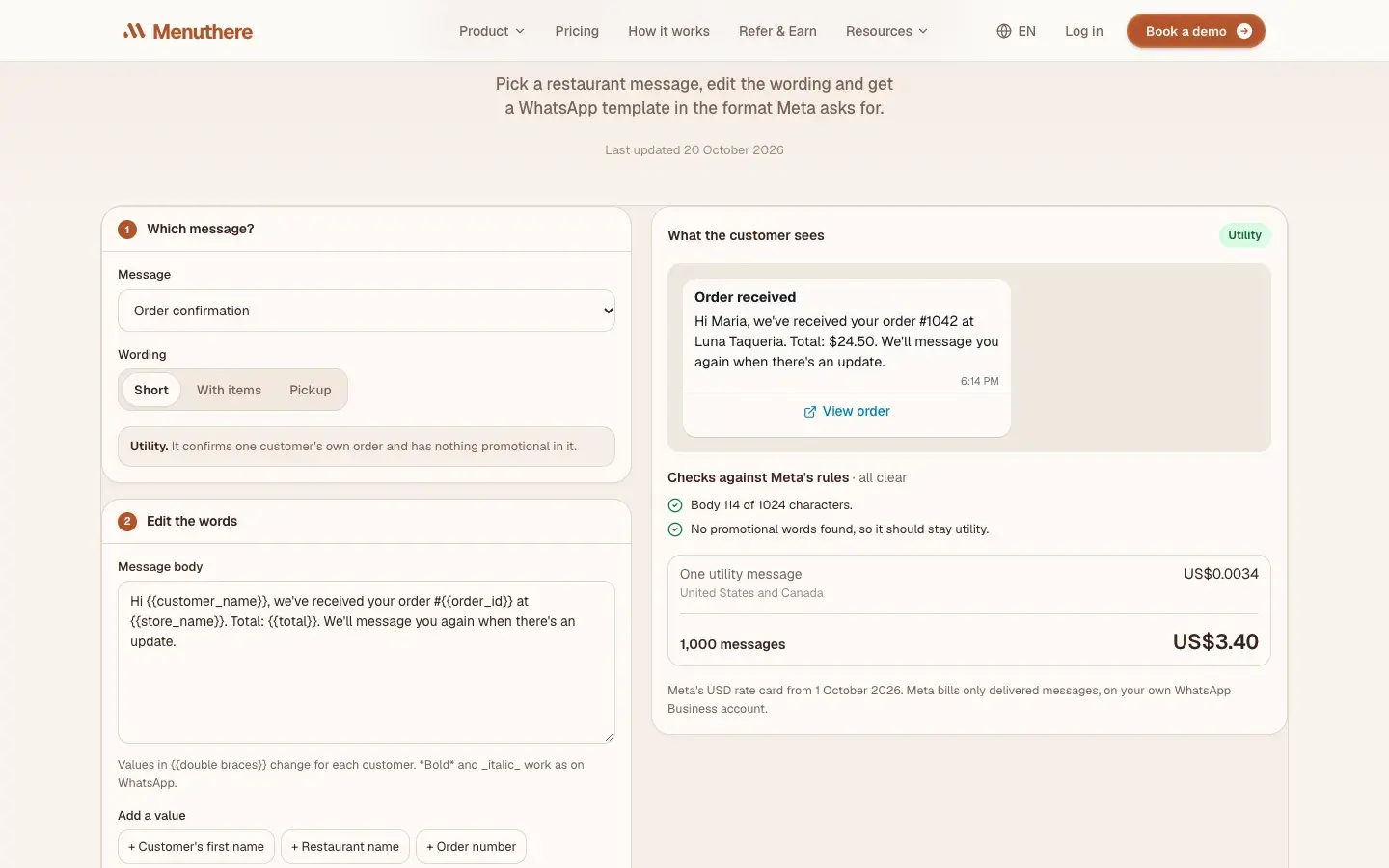
The WhatsApp template generator: pick a message, edit the words and see what the customer will read. It also has offer, win-back and abandoned-cart messages, which are Marketing templates.
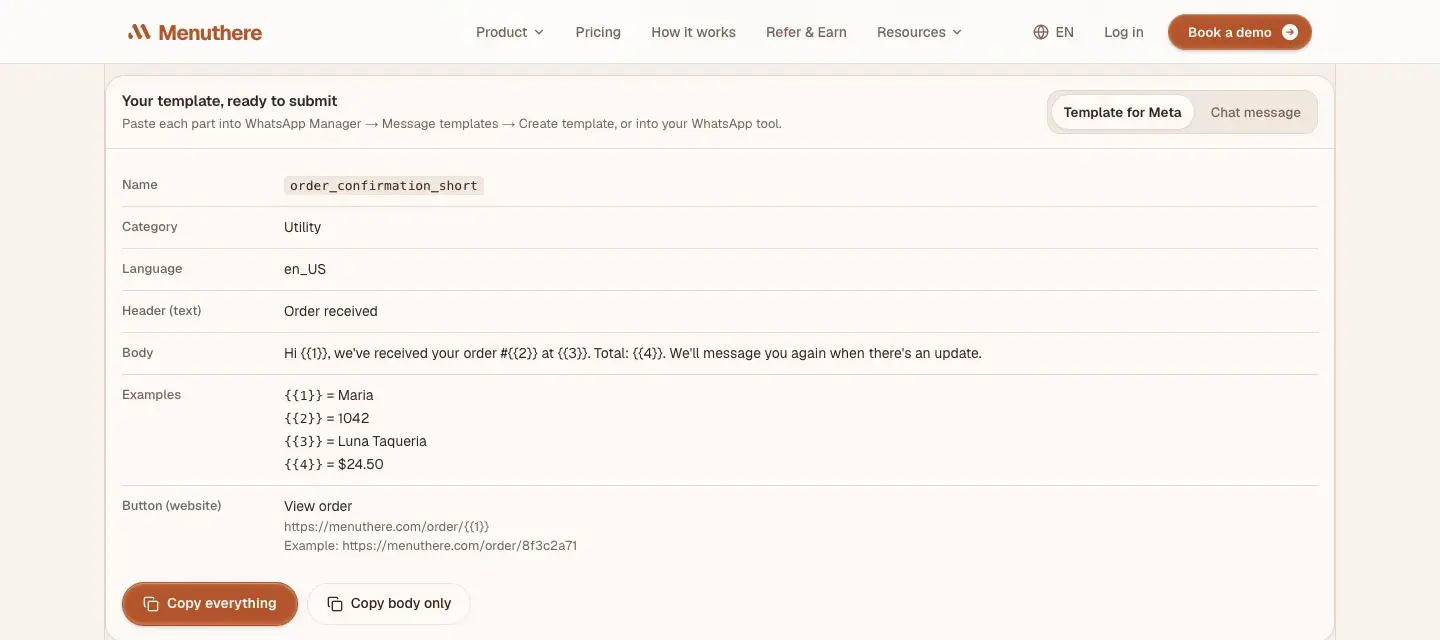
The output, ready to submit: name, category, language, body with {{1}} values and examples. This one is a Utility template. Only approved Marketing templates can be broadcast.
Open them here: WhatsApp cost calculator and WhatsApp template generator.
Worked example
The markup meter and the daily limit, in real numbers
Meta's rates below are from Meta's rate card as kept in Menuthere's cost calculator data (rateCard.ts, effective 1 October 2026). The 15% and 25% markups are examples of a provider adding a share on top of Meta's fee, not any named provider's price.
India, ₹0.8631 per marketing message. Meta charges only for delivered messages, so read these as delivered messages. 5,000 messages cost ₹4,315.50 at Meta's rate. Example: a provider that adds 15% charges ₹647.33 more, and one that adds 25% charges ₹1,078.88 more. For 10,000 messages Meta's fee is ₹8,631.00, plus ₹1,294.65 at 15% or ₹2,157.75 at 25%.
The markup meter, India. One 5,000-message offer a week for a year is 260,000 messages. At Meta's rate that is ₹224,406. A 25% example markup adds ₹56,101.50 a year. A flat ₹0.20 added per message is the same idea: on 10,000 messages it adds ₹2,000, which is 23% on top of ₹0.8631.
UK, £0.0458 per message. 5,000 messages cost £229.00 and 10,000 cost £458.00. A 25% example markup adds £57.25 and £114.50. A weekly 5,000 for a year is £11,908 at Meta's rate, plus £2,977 at 25%.
UAE, AED 0.2115 per message. 5,000 messages cost AED 1,057.50 and 10,000 cost AED 2,115. At 25%: plus AED 264.38 and AED 528.75. Germany, €0.1131 per message. 5,000 cost €565.50 and 10,000 cost €1,131, plus €141.38 and €282.75 at 25%.
The daily limit. Meta lets a business message 250, 2,000, 10,000, 100,000 or unlimited people a day, and new businesses start at 250. Menuthere uses your number's live limit, and 250 when it is not known. Days to finish = list size ÷ daily limit, rounded up:
- 5,000 customers at 250 a day: 20 days.
- 5,000 customers at 2,000 a day: 3 days (2,000 + 2,000 + 1,000).
- 10,000 customers at 2,000 a day: 5 days.
- 10,000 customers at 10,000 a day: 1 day.
The lesson: a new number on 250 a day should not plan a "this weekend only" offer for 5,000 people. Send it to your best customers first, or start a few weeks early.
Your own figures: put your country and list size into the WhatsApp cost calculator.
Win back regulars
Comeback messages: broadcasts that count who came back
A broadcast goes to a list once. Comeback messages run on their own and write to customers who have gone quiet, then show how many ordered again.
Who to chase
Pick the groups, such as VIPs, Regulars or Lapsed. Leave days quiet empty and each customer is judged by their own ordering rhythm, about 21 to 75 days.
Choose what to say
Use an approved Marketing template, or press Write my comeback message for help writing one. It then goes to Meta for review.
Safety rules
Nobody silent for over 180 days. At most 2 comeback messages per person, 60 days apart. Sent between 11 am and 8 pm store time, at least 7 days between batches.
Came back, measured
Past batches shows who ordered again within 14 days. When 40 or more customers qualify, one in ten is held back and not messaged, so "came back" is compared with people who got nothing.
Leaves room for broadcasts
A comeback batch uses at most 35% of your number's daily limit, so order updates and your own broadcasts still have room.
Stops when quality drops
When your number's quality rating is low, comeback batches are not sent. They never go from Menuthere's shared number, and +1 numbers (US and Canada) are left out.
Set-up
How to send your first broadcast in Menuthere
01
Connect your WhatsApp number
Go to Sales channel → WhatsApp and connect your number. Add a payment method to your WhatsApp account on Meta, because marketing messages are always charged.
02
Write a Marketing template
In Sales channel → WhatsApp → Templates, press New template, write your offer and send it to Meta for review. Templates belong to one number. Only approved Marketing templates can be broadcast.
03
Create the broadcast
Open Sales channel → WhatsApp → Broadcast and press New broadcast. Pick the template, fill its values with Recipient name or a Fixed value, and choose Send from if you have several numbers.
04
Pick who gets it
Use My customers, Enter manually or Upload Excel. Bad numbers and duplicates are removed and shown, and numbers on the Blocklist are left out.
05
Send now or schedule
Under When to send, choose Send now or Schedule for later. On a big list the button reads like "Send now — 5,000 over 20 days", so you see the finish before you press it.
06
Watch the results
The top of the Broadcast screen shows Sent today, Daily limit left and Est. spend today. Each broadcast shows Sent, Delivered, Read and Failed, and Details gives a per-person Excel report.
07
Turn on comeback messages
In Sales channel → WhatsApp → Comeback messages, switch on Turn comeback messages on, pick Who to chase and Choose what to say. Check Message analytics each month for messages by Meta category.
Step by step with every option: Docs: Broadcasts, Opt-outs and the blocklist and Comeback messages.
Honest limits
What Menuthere does not do, and who it is not for
Menuthere does not make WhatsApp messages free. Broadcasts are marketing templates, and Meta charges every one of them. The 1,000 free service messages a month per number do not cover broadcasts.
Before you pick it, check these limits:
- Not on Starter. Starter ($49) has your own number, WhatsApp ordering, order updates and flows. Broadcasts and comeback messages need Growth ($129) or Premium ($249).
- No US offers. Meta does not deliver marketing templates to US phone numbers. Order updates (utility messages) still arrive. Canada is not affected for broadcasts, but comeback messages leave out all +1 numbers.
- No way around the daily limit. Menuthere sends within your number's limit and does not raise your Meta tier. Meta raises it when your messages are high quality and you used at least half your limit in the last 7 days.
- Est. spend today is an estimate from Meta's rate card. Your real bill is in WhatsApp Manager → Billing.
- You write the template. Menuthere sends it to Meta for review from inside the dashboard, but Meta decides if it is approved.
- Sender fallback. A manual broadcast is sent from your connected number. If that send fails, it can retry from Menuthere's shared number. Comeback messages never do.
- Some sends fail by Meta's rules. Meta limits how many marketing messages one person gets from all businesses, so a few messages in a big broadcast come back as Failed. Meta charges only for delivered messages.
- Not for cold lists. Only message customers who agreed to hear from you. Buying numbers hurts your quality rating and can get your number limited.
Answered, plainly.
Sources (3) · checked 2026-11-25
- Pricing on the WhatsApp Business Platform · Meta for Developers, 2026-11-25
- Messaging limits · Meta for Developers, 2026-11-25
- Marketing templates: per-user limits · Meta for Developers, 2026-11-25
Send your next offer at Meta's own price
Book a call. We connect your WhatsApp number, set up your first Marketing template and show you the plan for your customer list.
- 0% commission
- 14-day free trial
- No contract