Best table reservation system with food ordering (2027)
Menuthere is the best pick for a table reservation system with food pre-ordering, because the booking and the dishes become one order your kitchen sees before the guests arrive.
See it on your own menu in a short call.
A short call with our team. We set it up on your menu with you.
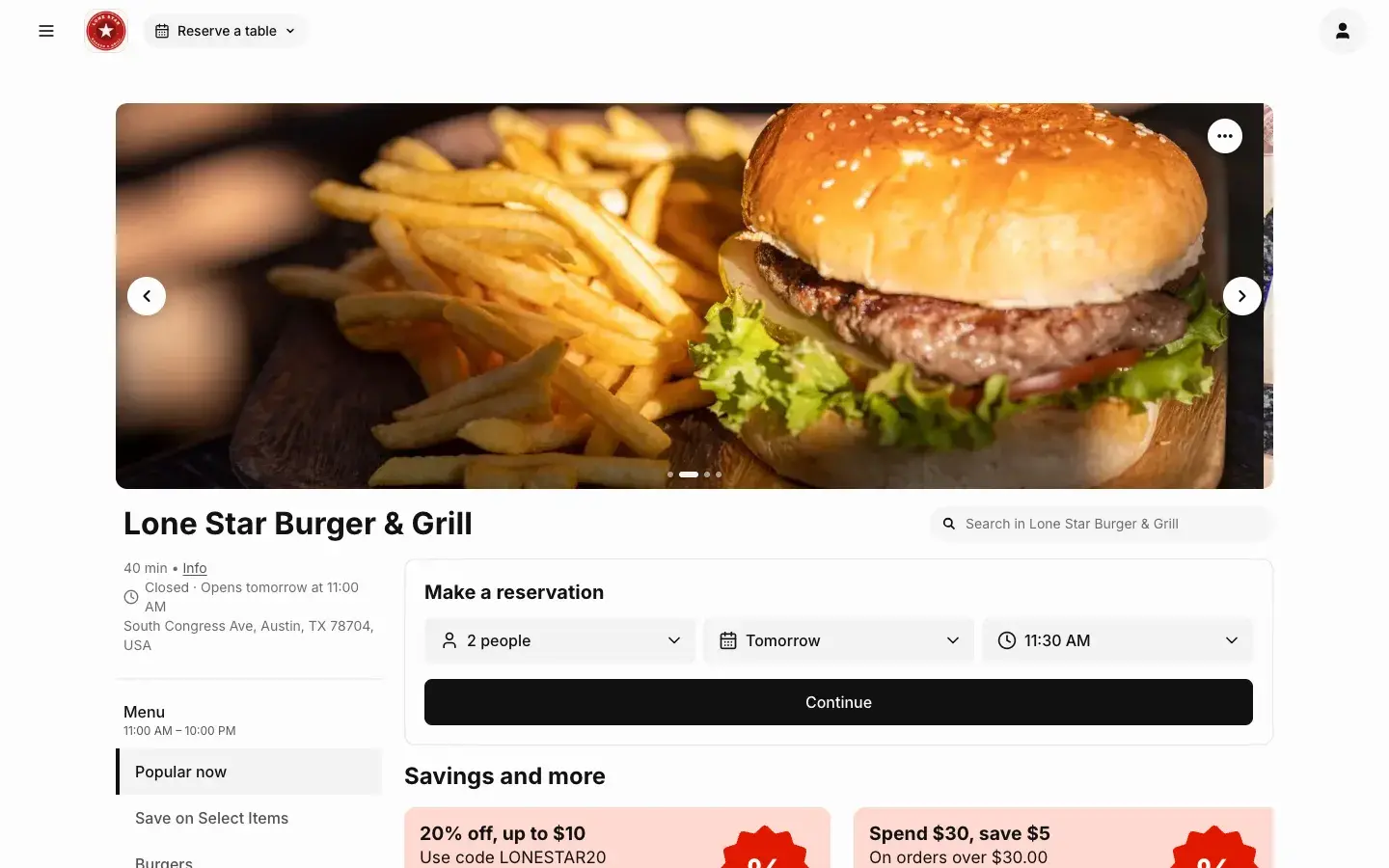
Menuthere is the best pick for a table reservation system with food pre-ordering, because the booking and the dishes become one order your kitchen sees before the guests arrive. Guests pick the number of people, the date and a time on your own link, then choose their food from your live menu, and you can make them pay for it at checkout. Table reservation is included from the Starter plan at $49 a month per location, with 0% commission on every order and a 14-day free trial. This guide explains how it works, gives you a test to judge any system, and says plainly what Menuthere does not do.
Our pick for table reservations with food ordering
Menuthere
Menuthere turns a table booking into an order with dishes, on your own website and link, so the kitchen knows what to cook before service starts. It takes no commission, and the money for the food goes to your own payment account.
- 0% commission
- From $49 a month
- 14-day free trial
- Your own link and QR
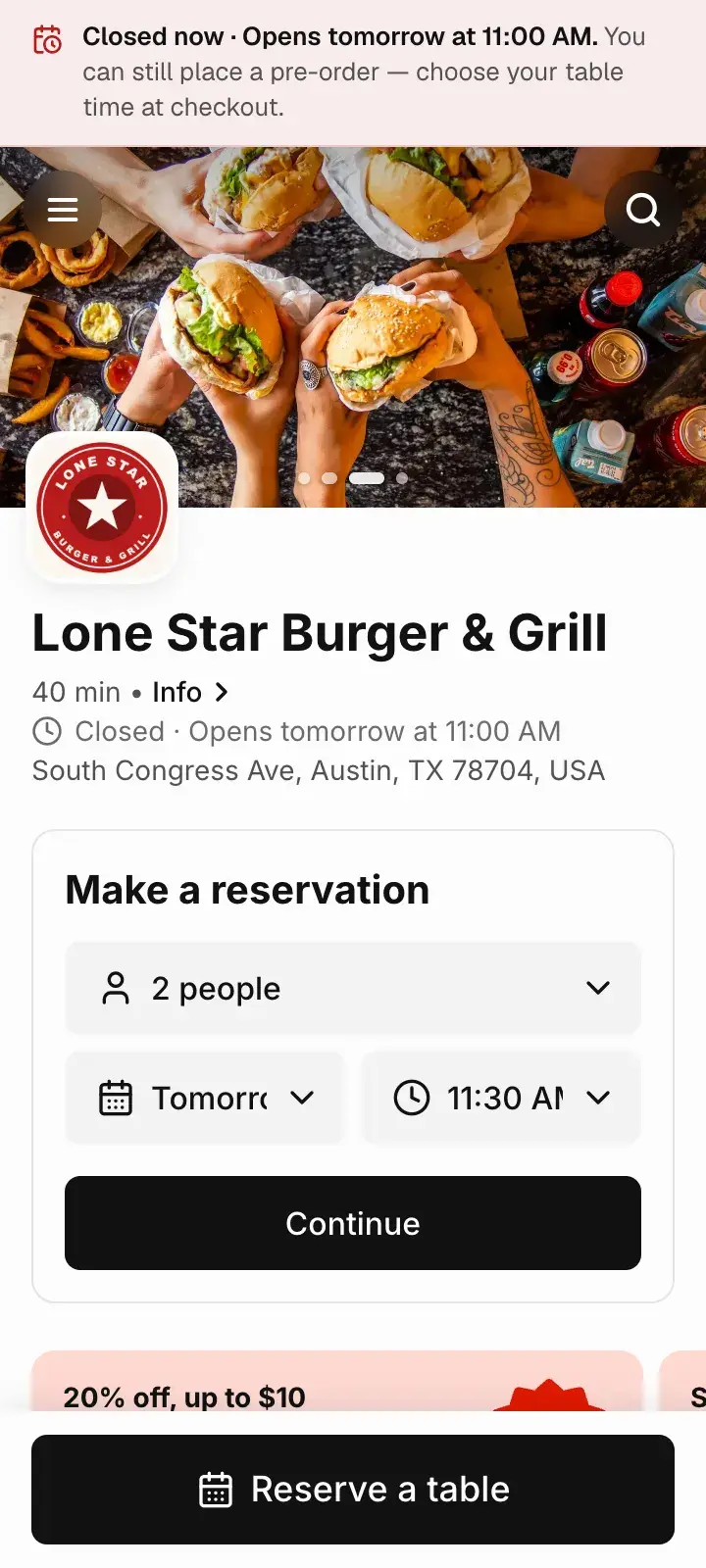
- Guests choose Reserve a table, pick the number of guests, a date and a time, then order food from your menu.
- Bookings per time slot shows a time as Full once it has that many bookings.
- Set Dine-in to online payment only and guests pay for their food when they book.
- The menu follows the booked time: if you show some dishes only at breakfast, a 9:00 AM table sees them and an 8:00 PM table does not.
- Guests can still book future times while you are closed.
- A Reservation link with a QR code for Instagram and table cards, and a Reserve button on your Google listing once your Google Business Profile is connected.
- A tables-only restaurant works too: switch on Reserve without food and off Reserve with food.
A test for any system
The Booked-and-Ready Test: seven questions before you choose
Answer yes or no for each system you look at. Each question shows the Menuthere setting that answers it. 7 yes: you sell the evening before it starts. 5 or 6: bookings work, but the kitchen still guesses. 4 or fewer: you have a diary, not a system.
01
Do the booking and the food become one order?
The kitchen should see the dishes with the table time, not in a separate message. In Menuthere, Reserve with food makes the reservation an order with dishes.
02
Can you cap how many bookings land on one time?
In Menuthere, Bookings per time slot. It counts bookings, not seats, so pair it with Most guests per booking to keep one time from filling with large groups.
03
Can guests pay for the food before they come?
In Menuthere, turn Dine-in to online only in Payment options by order type. Note that the same row also sets how table-QR orders pay.
04
Does the menu follow the booked time?
A guest booking dinner at noon should see the dinner menu. Menuthere shows dishes for the booked time and warns at checkout about a dish not served then.
05
Can guests book while you are closed?
Guests often plan a meal when your doors are shut. In Menuthere, open future times stay bookable while the store is shut by its working hours.
06
Is there one link for Instagram, Google and print?
In Menuthere, the Reservation link (it ends in /reserve) with Copy and Download QR, plus the Reserve button Menuthere sets on your Google listing once your Google Business Profile is connected.
07
Can you take bookings without food?
In Menuthere, Reserve without food. Used alone, with Takeaway and Delivery off, the Express menu design becomes a menu to look at, with a Make a reservation panel and no cart.
Kinds of tools
Menuthere compared with the other kinds of booking tools
Four kinds of tools take table bookings. They differ most in what happens to the food and to the money.
| What matters | Menuthere | Reservation-only apps | Delivery marketplaces with a booking add-on | Website builders with a booking form | Prepaid ticket tools |
|---|---|---|---|---|---|
| Guests order dishes with the booking | Yes, from your live menu | Usually no | Sometimes, as a separate order | No | A fixed ticket or set menu |
| Kitchen sees the dishes before guests arrive | Yes, one order | No | Varies | No | Only the set menu |
| Guests pay for the food when they book | Yes, with Dine-in set to online | Deposit or card hold on some | Varies | No | Yes, a fixed price |
| Limit bookings per time | Yes, bookings per time slot | Yes, often by seats and tables | Varies | Rarely | Yes, tickets per event |
| Fee on each booking or order | None, 0% commission | Often per cover on network bookings | Commission on orders | None | Often a ticket fee |
| Guest details stay with you | Yes | Shared with the app | Usually kept by the marketplace | Yes | Shared with the tool |
| Floor plan and table assignment | No | Often yes | Rarely | No | No |
The other columns describe kinds of tools in general. Check any single product yourself, because each one differs.
Real screenshots
What the guest sees, from booking to checkout
Real screens from a Menuthere demo store, Main Street Pizza. The guest books the table first, then orders food on the same visit.
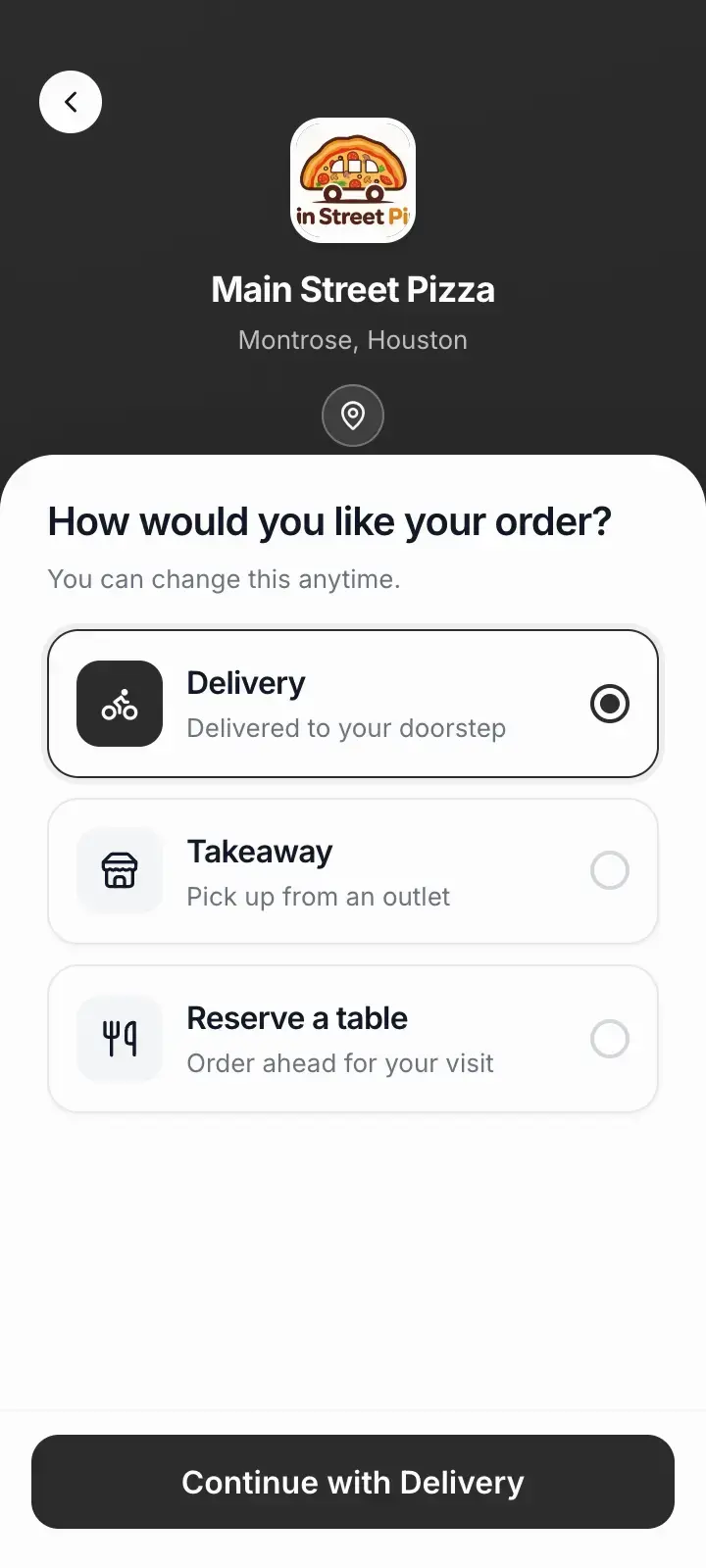
Reserve a table sits next to Delivery and Takeaway, with the line Order ahead for your visit.
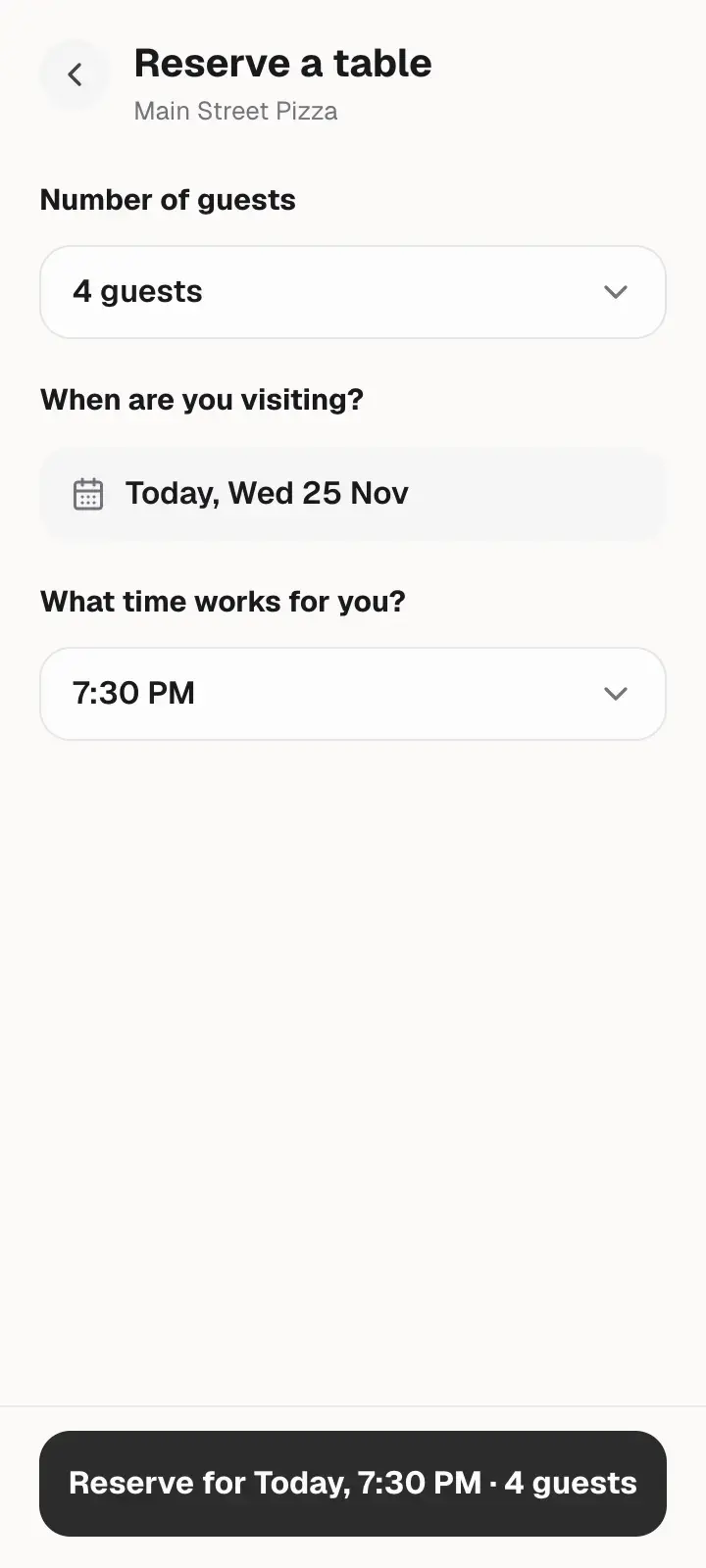
The guest picks the number of guests, the day and a time, then taps Reserve.
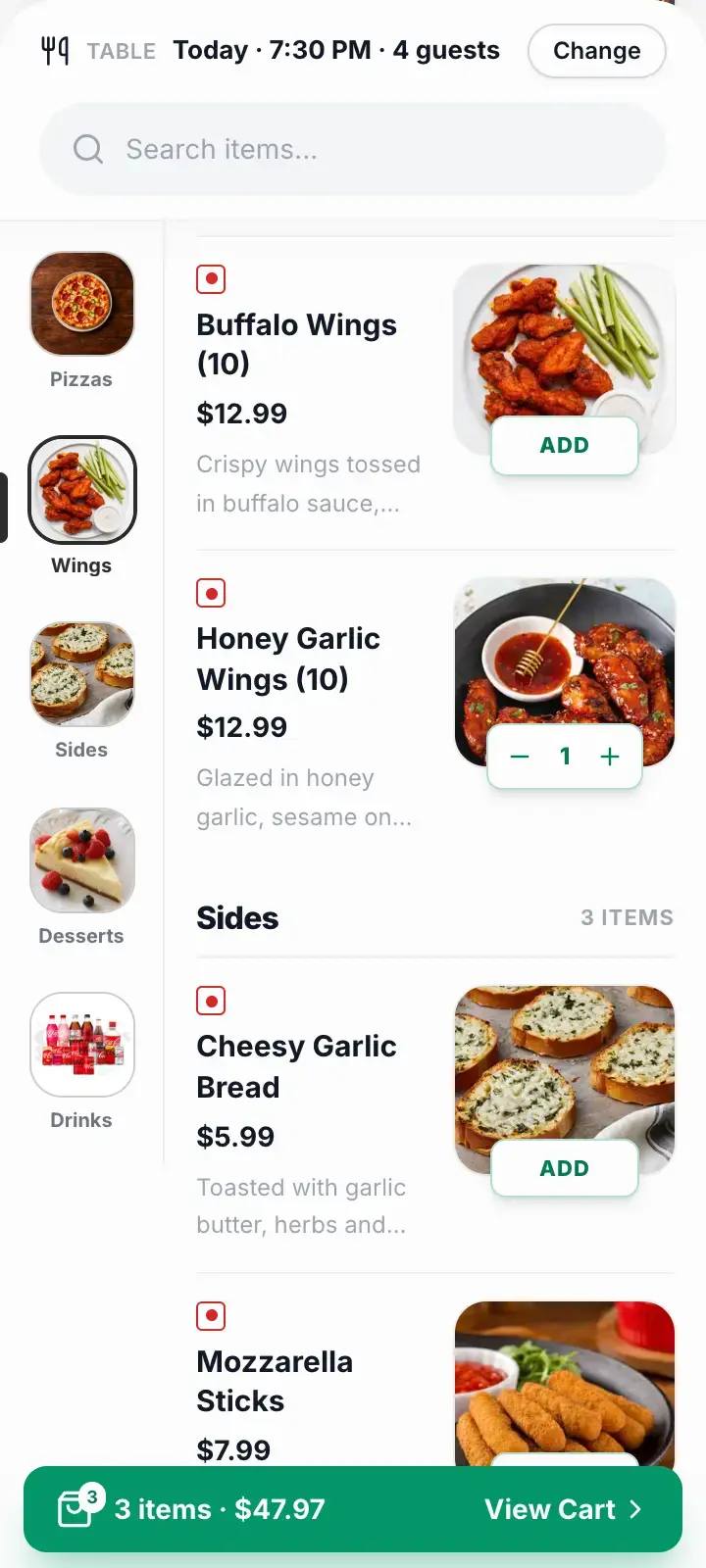
The booking stays at the top of the menu while the guest adds dishes.
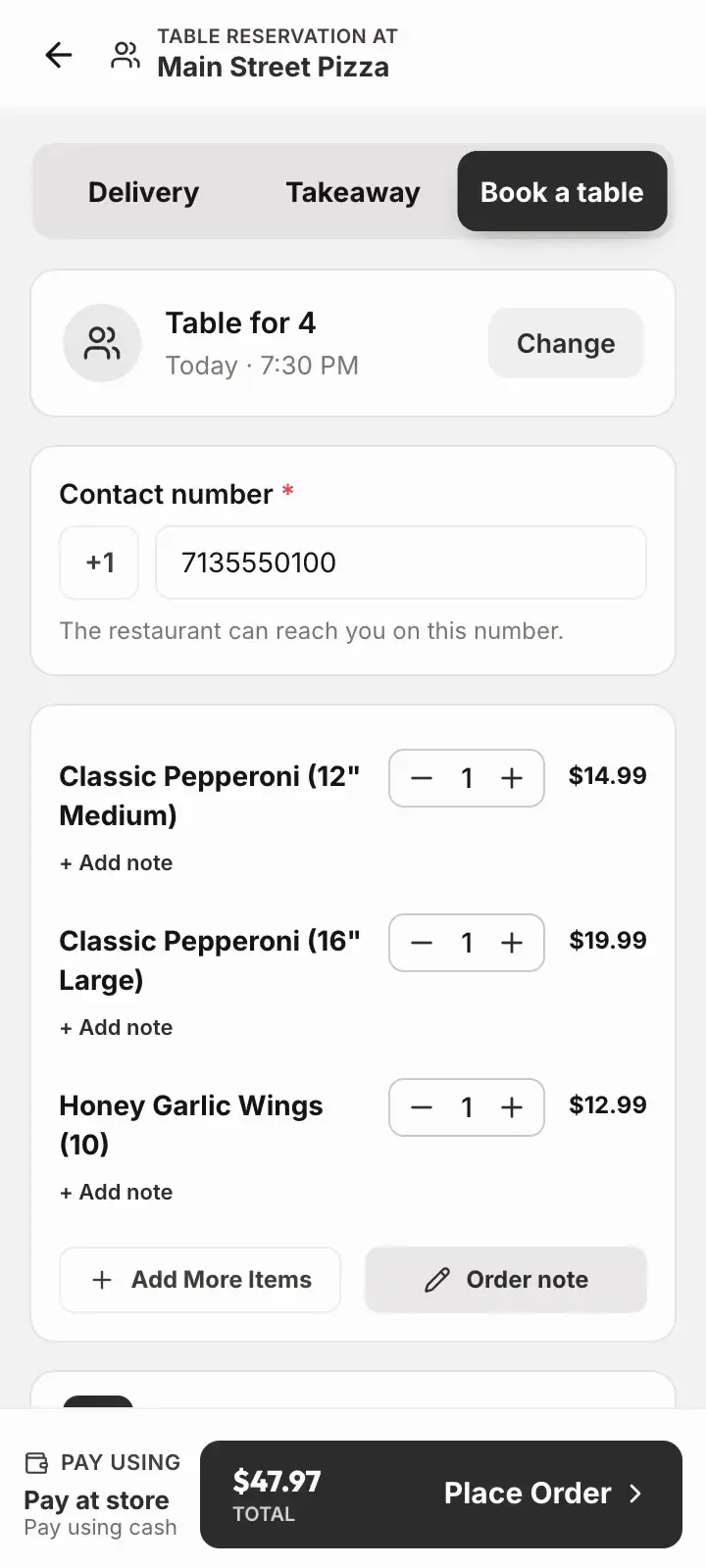
Checkout shows Table for 4 with the food. This store lets guests pay at the store; switch Dine-in to online only to take payment here.

Screens from Main Street Pizza, a Menuthere demo store, captured 25 Nov 2026.
Worked example
Covers-to-Cash: a Friday night, worked out
All numbers below are made up to show the method. Put in your own covers, spend and no-show rate.
Example: a 60-seat restaurant takes bookings for Friday dinner, 7:00 PM to 11:00 PM, with Booking times set to Every 30 min, Bookings per time slot set to 6 and Most guests per booking set to 8. By Friday it has 12 reservations for 40 covers.
Booked food. At an example average food spend of $28 a cover, 40 × $28 = $1,120 of food is booked.
Money at risk. At an example no-show rate of 5%, 2 covers do not come. Without pre-ordering, that is about $56 of food never sold, and the kitchen prepped for 40 covers without knowing the dishes.
Money already in. With Reserve with food on and Dine-in set to online only, the $1,120 is paid at checkout into your own payment account. Menuthere takes 0% commission. Your payment gateway charges its own fee, so check its rate. A no-show's food is already paid; whether you refund it is your decision.
Prep you can do early. Every dish for the 7:00 PM and 7:30 PM tables is known before the doors open, so the kitchen can portion and prep for those orders.
Plan cost. Starter is $49 a month per location. At the example spend of $28 a cover, that is less than 2 covers of food a month (49 ÷ 28 ≈ 1.75).
- Booked covers × average food spend = booked food
- Booked food × your no-show rate = money at risk
- Prepaid share × booked food = money already in
- Pre-ordered dishes ÷ all dishes for the night = prep you can do early
Want to see what a month of bookings means for your costs? Try the free restaurant break-even calculator.
Set-up
How to set it up in Menuthere
Everything is in the dashboard. Full details are in the docs page Table reservations.
01
Switch on Table reservation
Go to Settings → Ordering → Order types and switch on Table reservation. Menuthere fills in starting settings: it asks the number of people and, if you have not set meal times yet, opens Lunch (12:00 PM to 3:30 PM) and Dinner (7:00 PM to 11:00 PM), ready to change.
02
Choose how guests reserve
In Settings → Ordering → Prebooking settings, under How guests reserve, keep Reserve with food on. Turn on Reserve without food too if some guests only want a table.
03
Set when guests can book
In When guests can book, set your Meal times, the Booking times (Every 15 min, Every 30 min, Every hour or Whole meal), your Open days and how many days ahead guests can reserve.
04
Set your limits
In Guests, set Most guests per booking and Bookings per time slot. Leave Bookings per time slot at 0 for no limit. A time with that many bookings shows as Full; cancelled bookings don't count.
05
Make guests pay for the food (optional)
Connect your payment gateway, then in Settings → Payments & tax → Payment options by order type turn Online on and Cash off for Dine-in. Keep Ask payment after order complete off, or guests pay after the meal instead. This also changes how table-QR orders pay. See payment options for each order type.
06
Share the Reservation link
In the Reservation link card, press Copy for Instagram and WhatsApp, or Download QR for table cards and the window. If your Google Business Profile is connected in Settings → Integrations, keep the Reserve button switch on and your Google listing opens your booking page.
07
Send guests a reminder email (optional)
Connect your Gmail in Settings → Integrations → Gmail. Checkout then asks guests for an email, and they get a reminder 1 hour before the table once you accept the booking. Bookings made less than 2 hours ahead get no reminder.
On the day
What happens after a guest books
It arrives as an order
Reservations show in your orders as Table reservation, or Table reservation · without food. You accept it, then complete it once the guests have come.
You get reminded
Your phone gets a push notification 1 hour before the table and again when the time starts. If you don't want these, ask our team to switch them off for your store.
The menu matches the time
Dishes you show only at set times follow the booked time. See show dishes at set times.
Bookings while you are closed
Table reservations are always for later, so guests can book open future times while you are shut. See take pre-orders while closed.
A Reserve button on Google
With your Google Business Profile connected and the Reserve button switch on, Menuthere points your listing's Reserve button to your own page while you take reservations, and removes it when you stop. Guests book on your page, not inside Google. More on the Reserve button on Google.
Eat in without a time
Turn off Ask for a date and time and the choice becomes Dine-in: guests order now and eat at the restaurant, with no date, time or guest count.
Honest limits
What Menuthere does not do, and who it is not for
Menuthere is built for restaurants that want guests to book a time and order food on the restaurant's own link. If you run a large dining room where staff seat guests by table number, or you need a waitlist for walk-ins, a reservation-only app may suit you better, and you can still use Menuthere for ordering.
For takeaway and delivery orders booked ahead, see the pickup ordering guide.
- No deposits, card holds or no-show fees. Prepaying the food is the only protection.
- No automatic refunds or cancellation rules for no-shows. Refunds are your decision.
- No floor plan, table numbers on bookings or table assignment.
- No waitlist or walk-in queue.
- No SMS reminders. Guests get an email only with Gmail connected, the booking accepted and made at least 2 hours ahead.
- The look-only menu for tables-only stores is on the Express menu design only, for now.
- Bookings per time slot counts bookings, not seats.
- Setting Dine-in to online only also applies to table-QR orders.
- Stores connected to Petpooja always reserve with food: no Reserve without food and no Reservation link card.
- Table reservation needs the Starter plan or higher.
Answered, plainly.
Sources (2) · checked 2026-11-25
- Manage booking, food ordering and other links on your Business Profile · Google Business Profile Help, 2026-11-25
- Add food ordering links to your Business Profile · Google Business Profile Help, 2026-11-25
Sell the evening before it starts
Book a short demo and we will switch on table reservation with food ordering on your own menu, set your slot limits and show you the guest flow.
- 0% commission
- 14-day free trial
- No contract