Best restaurant management system (2027)
Menuthere is the best restaurant management system for small and independent restaurants, because it puts every way customers order (your website, QR tables, WhatsApp, Instagram and Google) into one Orders screen with one menu, at 0% commission.
See it on your own menu in a short call.
A short call with our team. Bring your menu and your questions.
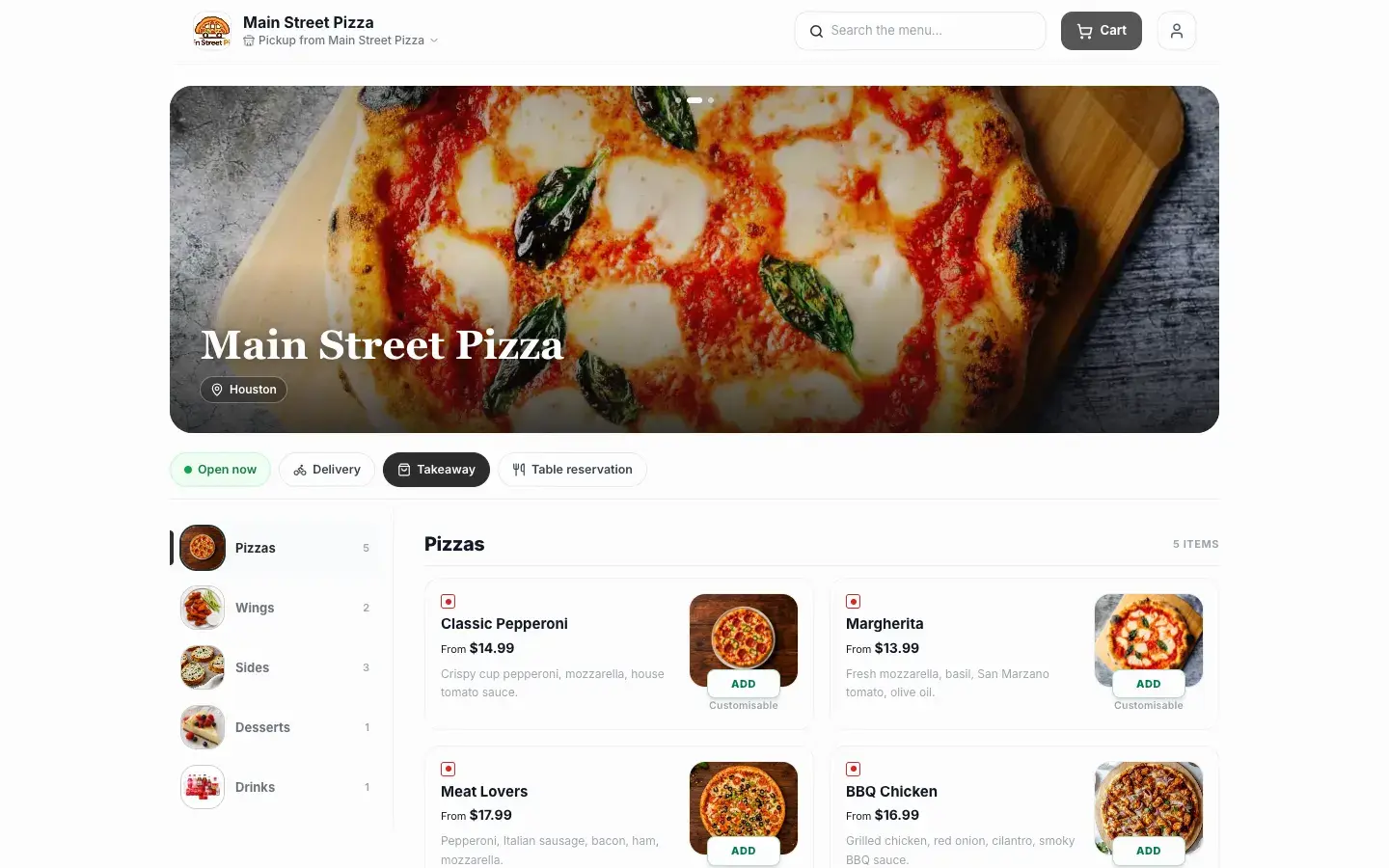
What your customers see: your own ordering website, fed by the same menu as your QR tables and POS.
Menuthere is the best restaurant management system for small and independent restaurants, because it puts every way customers order (your website, QR tables, WhatsApp, Instagram and Google) into one Orders screen with one menu, at 0% commission. Plans start at $49 a month per location (Starter), with a 14-day free trial on Starter and Growth. Counter billing, waiter phones, dish stock and ingredient inventory are add-ons you turn on only when you need them. This guide gives you a 4-number test to run at closing tonight, an hour-by-hour day in one dashboard, and a checklist of what to cancel, keep and connect. For the full feature list, see restaurant management software.
Our pick
The best restaurant management system for most small restaurants
Menuthere
Menuthere runs the part of the day most systems leave out: taking orders from every channel and getting them to the kitchen, with one menu behind all of them. It charges no commission on orders, and you add counter billing, stock and inventory only if your kitchen needs them.
- 0% commission
- From $49 a month
- 14-day free trial
- Unlimited orders
- Add-ons on request
- One Orders screen with Live orders, All orders, Prebookings and Dropped orders for every channel: website, QR tables, pickup, delivery, scheduled orders, table reservations, WhatsApp and Instagram.
- One menu with sizes, add-ons, photos, allergens and dish-level out of stock. Import it from a photo or PDF.
- Kitchen tickets print on every plan. Settings → Printing → Auto accept and print prints them without anyone pressing a button.
- The partner app for Android and iPhone rings until someone accepts the order, on every plan.
- Your own drivers with live tracking on Starter. Couriers on your own Uber Direct (where Uber Direct operates), Stuart or Lalamove account on Growth.
- Counter POS, Captains for waiter phones, Dish Stock and Inventory are add-ons on request. No plan includes them.
- Premium adds a head office over up to 3 locations: set the menu, offers and settings once and push them to every outlet.
A test to run tonight
The Close-Out Count: 4 numbers before you buy anything
At closing time, before you look at any demo, write down these 4 numbers for today. They tell you what kind of system you need, and whether you need one at all.
01
1. Logins
Count the separate apps, tablets and tabs you opened today to take, make and deliver orders: order tablets, website admin, POS, printer app, stock sheet, WhatsApp, your Google listing. Write the number.
02
2. Menu copies
Pick one dish and count every place its name and price lives. If you changed a price tomorrow, how many places would you have to change it?
03
3. Re-types
Count how many times today someone typed an order from one screen into another: tablet to POS, WhatsApp chat to kitchen paper, phone call to bill.
04
4. Surprise sell-outs
Count how many times a customer ordered a dish the kitchen had already run out of.
How to read it. If logins are above 3 or menu copies are above 2, one system will pay you back in time before it pays you back in money. If re-types are above 0, you need every channel to land in one order screen. If surprise sell-outs are above 0 on most days, start with dish-level stock (plates per dish) before full ingredient inventory.
Example, not a real store: a 40-seat cafe with 4 logins, 3 menu copies and 6 re-typed orders a day. That cafe should put its channels and menu in one place first, and leave inventory for later.
One day in one dashboard
Hour by hour: which screen you use, and on which plan
A restaurant management system earns its price during service, not in the demo. Here is one day in Menuthere, with the screen for each job. Times are an example.
01
10:00 Open
Open the store from the dashboard header, or let your working hours do it. Mark dishes you will not have today as out of stock in Menu (every plan). Set today's plate counts in More → Dish Stock (add-on on request). Removes: surprise sell-outs.
02
10:30 Prep
Enter the morning's supplier bill in More → Inventory, and stock goes up at its landed cost, with delivery and other charges on the bill spread over the items. Press Make a batch for prep items like sauces (Inventory is an add-on on request). Removes: the stock spreadsheet.
03
12:00 Lunch
Orders from your website, QR tables, WhatsApp, Instagram and the Order online button on Google all land in Orders → Live orders. The partner app rings, and Auto accept and print sends the kitchen ticket. Removes: logins and re-types.
04
13:00 Dine-in
Guests scan the table QR and order from their phone (Sales channel → Table ordering). The order already knows the table. Waiters can take orders on their phones with More → Captains (add-on on request).
05
15:00 Quiet hour
Change a price once in Menu and it is live on your website and QR menu, and goes to your Google listing by itself once Google is connected. Set up a lunch deal in Promotions → Offers. Removes: menu copies.
06
19:00 Dinner rush
Send deliveries with your own drivers and live tracking (Starter), or book couriers on your own Uber Direct, Stuart or Lalamove account (Growth). Delivery zones and fees live in Settings → Ordering → Delivery settings.
07
22:30 Close
Check today's sales in Analytics and download reports. Count stock in Inventory → Counts and press Post count (add-on). On Premium, the head office sees every outlet's day on one screen. Then do your Close-Out Count again.
Printable checklist
Cancel, keep or connect: tick each tool you pay for today
No single system replaces everything. Go through your monthly bills and put each tool in one of these three columns.
Cancel (Menuthere covers it)
A separate ordering-website builder. A QR menu subscription. A reservation tool that cannot take a food order. A WhatsApp order bot from a reseller. A review-reply tool that only drafts. Online-order tablets for any marketplace you leave. The stock spreadsheet, if you take the Inventory add-on.
Keep (Menuthere does not do it)
Payroll. Staff scheduling and the time clock. Accounting and your general ledger. Your card terminal hardware contract. Delivery marketplaces you still want for new customers to find you.
Connect (keep it, link it)
A Square or Epos Now POS (Growth; Clover and Foodics cards are also in Settings → Integrations), or Petpooja for Indian stores. Your own Stripe, Razorpay, Easebuzz or Moyasar account for online payments. Uber Direct, Stuart or Lalamove for couriers (Growth).
Compare by type
Menuthere vs the 4 kinds of restaurant system
Most "best" lists compare brand names. It is more useful to compare kinds of tools, because each kind is built around a different part of the day.
| What matters | Menuthere | POS-first systems | Back-office suites | Delivery marketplace tools | Stack of single apps |
|---|---|---|---|---|---|
| Built around | Taking orders from every channel and sending them to the kitchen | The till at the counter | Costs, staff and accounts | Orders placed inside the marketplace | One job per app |
| Your own ordering website, QR, WhatsApp, Instagram | Included from Starter | Often a paid extra, or partly | Not their focus | No, customers order in the marketplace | Yes, one app each |
| Commission on orders | 0% (your gateway's card fee applies) | Usually none on in-store sales | Not involved in orders | A share of every order | Depends on each app |
| One menu everywhere | Yes | In store, sometimes online | Recipes, not the customer menu | A separate menu per marketplace | No, one copy per app |
| In-store billing | POS add-on, or the Menuthere POS app, or connect Square / Epos Now (Growth) | Their main strength | Usually through a POS | No | Separate POS |
| Ingredient inventory | Inventory add-on, with recipes per dish and size | Often included or an extra | A main strength | No | Usually a spreadsheet |
| Payroll, rotas, accounting | No | Some include rotas and time clock | Their main strength | No | Separate apps |
| Who owns the customer list | You (customer list on Growth) | You | You | Mostly the marketplace | Split across apps |
| Several locations | Head office on Premium, up to 3 locations, then $79 each | Often, at a higher tier | Often | One listing per location | Hard to keep in step |
Pick a POS-first system if most of your sales are at the counter and online orders are rare. Pick a back-office suite if your main pain is payroll and accounts. Pick Menuthere if your pain is orders arriving in too many places.
Real screens
What your customers see
These are real screens from Menuthere demo stores, taken on a phone. Every order placed here lands in the same Orders screen as your website, WhatsApp and Instagram orders.
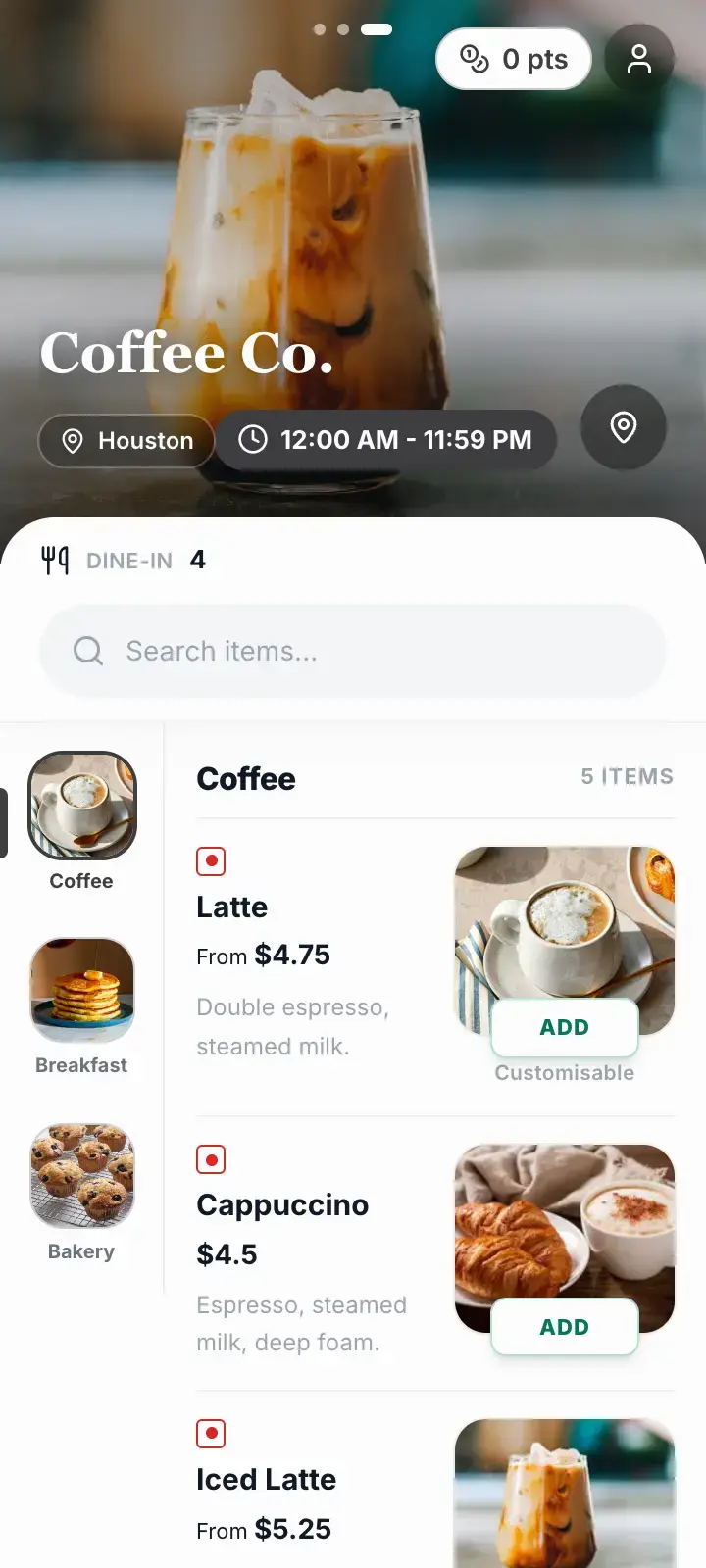

A guest scans the QR on table 4. The menu already knows the table.
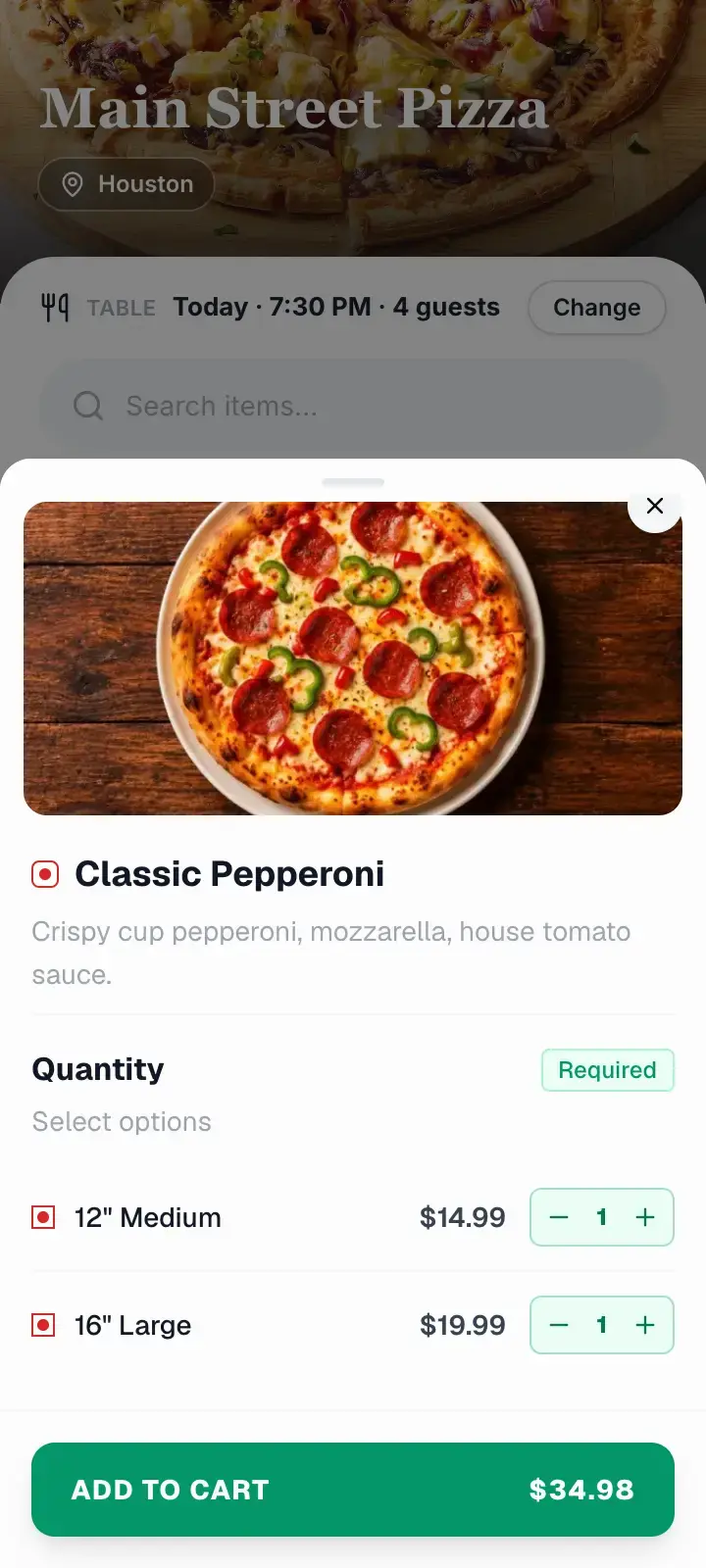
Sizes and add-ons come from your one menu, so a price change shows everywhere.
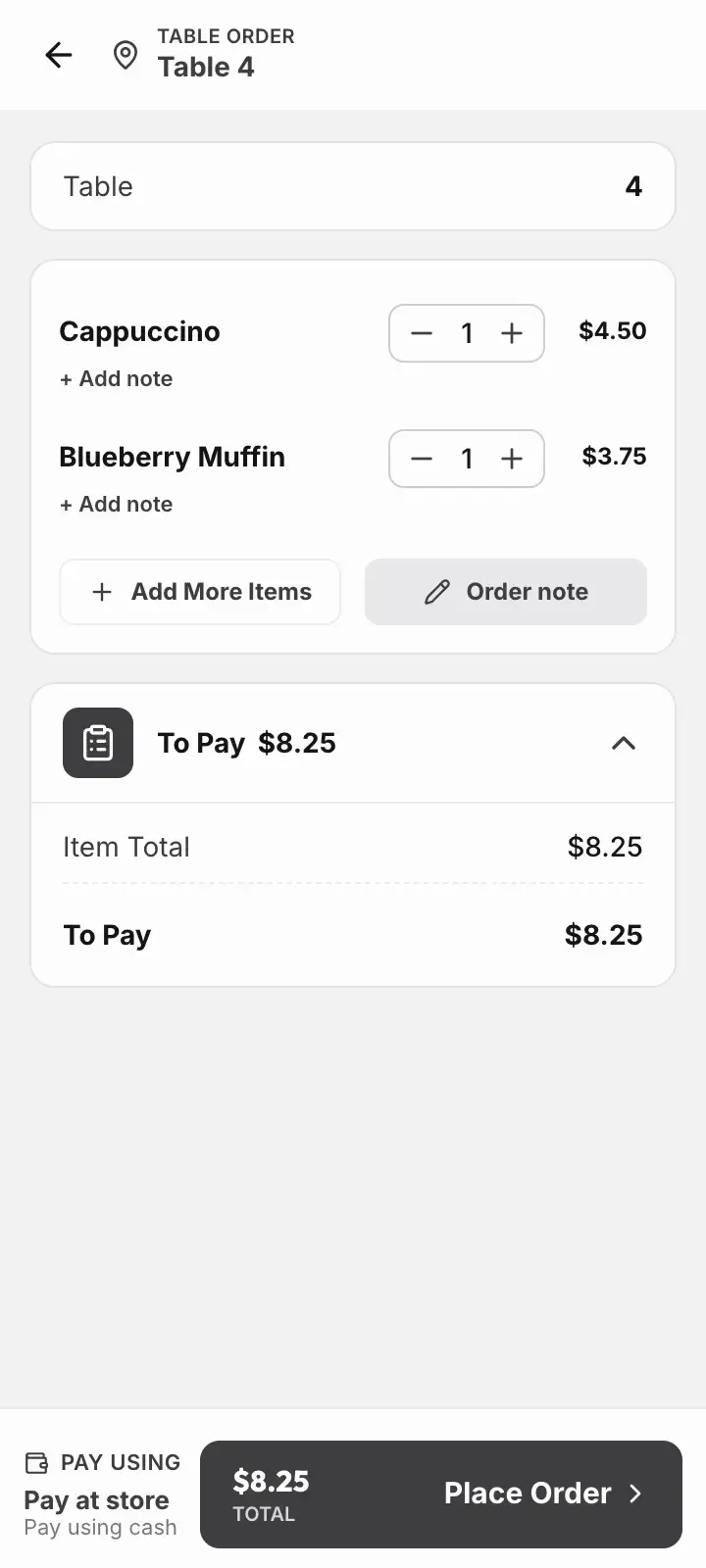
The checkout carries the table number, so nobody re-types the order.

Screens from Menuthere's own demo stores. Dashboard screens are not shown here.
Worked example
What moving some orders off a marketplace is worth
Example, not a promise. Swap in your own numbers.
This example uses the calculator defaults in Menuthere's own US delivery app commission data (see US delivery app commission): 300 app orders a month at a $30 average, on a 25% commission. 25% is one of the published US delivery rates in that data; other plans there charge less or more, so put in your own rate.
Today: 300 × $30 = $9,000 of app sales. At 25%, the commission is $2,250 a month.
Move one order in three to your own channels (website, QR, WhatsApp): 100 × $30 = $3,000. Commission avoided: $3,000 × 25% = $750. A card fee instead, at Stripe's standard US price of 2.9% + 30¢ (your gateway sets the real fee): $87 + 100 × $0.30 = $117. Menuthere Starter: $49.
Net difference: $750 − $117 − $49 = $584 a month, or $7,008 over 12 months.
Break-even: each direct order saves $7.50 of commission and costs $1.17 in card fees ($30 × 2.9% + $0.30), so it saves $6.33. $49 ÷ $6.33 ≈ 7.7, so about 8 direct orders a month cover Starter.
Run your own numbers with the free restaurant profit margin calculator and the food cost calculator.
Setup
How to set it up in Menuthere
The first four steps fit in an afternoon. On Growth, our team builds your menu, website and QR cards for you.
01
Add your menu
In Menu, import your menu from a photo or PDF, then check sizes, add-ons and photos. See import your menu.
02
Choose how people order
In Settings → Ordering, set your order types, then Delivery settings, Delivery boy settings for your own drivers, and Prebooking settings for scheduled orders and table reservations.
03
Switch on your channels
Under Sales channel, set up Website, Table ordering, WhatsApp, Instagram and Google Business. Google Business management is included on every plan today.
04
Get orders to the kitchen
Install the partner app, then turn on Settings → Printing → Auto accept and print so kitchen tickets print by themselves. See kitchen tickets.
05
Take payments
In Settings → Payments & tax, connect your own Stripe, Razorpay, Easebuzz or Moyasar account. Money goes to your account; Menuthere takes no commission.
06
Add what your kitchen needs
Ask Menuthere support to turn on POS, Captains, Dish Stock or Inventory. They then appear in the sidebar and under More. On Growth, connect an existing POS in Settings → Integrations.
Honest limits
What Menuthere does not do
A good system is clear about where it stops. Check these before you book a demo.
Menuthere is built for restaurants that take orders from several channels. If almost all of your sales are walk-in cash at the counter, a POS-first system may suit you better.
Ingredient inventory only moves stock once a dish has a recipe. Without recipes, use the free restaurant inventory sheet or start with Dish Stock.
- No staff scheduling, time clock, payroll or HR. Use the free staff rota maker for rotas.
- No accounting, general ledger or tax filing.
- No kitchen display screen in the web dashboard. The dashboard prints kitchen tickets; a kitchen screen exists only in the Menuthere POS app.
- The web dashboard needs an internet connection. Only the Menuthere POS app works offline.
- POS, Captains, Dish Stock and Inventory are add-ons on request, not part of any plan.
- Loyalty points, reviews, the customer list and courier delivery need Growth. Starter has standard sales reports; Growth adds advanced analytics.
- Head office for several outlets is Premium only. On Starter and Growth, each outlet is its own store.
- Uber Direct couriers are only in the countries Uber Direct serves, not in India.
Answered, plainly.
Sources (1) · checked 2026-11-25
- Stripe pricing: 2.9% + 30¢ per successful US card charge · Stripe, 2026-11-25
Run your Close-Out Count, then talk to us
Bring your 4 numbers and your menu to a short call. We will show you which plan and add-ons fit your kitchen, and which tools you can cancel.
- 0% commission
- 14-day free trial
- No contract